
SmartStay Ex Pro1.5.1 - Get APK
You'll be able to download in few seconds.
Publisher Description
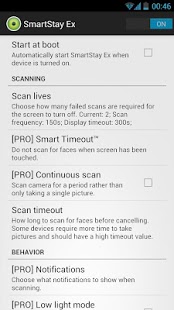
SmartStay Ex keeps your screen from turning off while you are using it.
SmartStay Ex scans the front camera for faces at regular intervals. If a face is found, it will keep the screen from turning off. There are many advanced options available and many more planned!
PRO APP REQUIRES FREE APP TO WORK
Suggestions: https://eyespy.uservoice.com/
Features
- Supports Android 2.3+
- Customizable check frequency
- SmartTimeout™ - Only scan when screen is about to turn off
- [PRO] Optional status bar notifications
- [PRO] Optional customizable vibration notifications
- [PRO] Continuous mode - scan for a few seconds rather than taking a single picture
- [PRO] Low light mode
- [PRO] Exception list - don't scan in chosen apps (e.g. app that lags while scanning)
FAQ
Q: Does SmartStay Ex waste battery?
A: SmartStay Ex wastes very little battery, especially when vibration notifications are disabled.
Q: Does SmartStay Ex only work if it recognises my own face?
A: SmartStay Ex does not recognise faces, it just detects them, so it will work with any face.
Q: Do camera apps work when SmartStay Ex is enabled?
A: Yes, but occasionally there could be a few second delay if SmartStay Ex is scanning.
Q: Why is continuous mode only available on Android 4.0 ICS devices?
A: Continuous mode (or live face detection) is a feature that was added in Android 4.0 and is not available in previous versions.
Q: Why does SmartStay Ex scan even if the screen is not about to turn off?
A: It is not possible for an app to detect when the screen is about to turn off so SmartStay Ex must check regularly whether a face is visible.
Devices
Known Supported Devices:
- HTC One S
- HTC Sensation 4G
- Motorola Atrix
- Samsung Epic 4G
- Samsung Galaxy Nexus
- Samsung Galaxy Note
- Samsung Galaxy S2
- Samsung Galaxy S3
- Samsung Nexus S
- Sony Xperia S
Known Unsupported Devices:
- Meizu MX
About SmartStay Ex Pro
The company that develops SmartStay Ex Pro is nebkat. The latest version released by its developer is 1.5.1.
To install SmartStay Ex Pro on your Android device, just click the green Continue To App button above to start the installation process. The app is listed on our website since 2012-08-03 and was downloaded 0 times. We have already checked if the download link is safe, however for your own protection we recommend that you scan the downloaded app with your antivirus. Your antivirus may detect the SmartStay Ex Pro as malware as malware if the download link to com.beansoft.eyespy is broken.
How to install SmartStay Ex Pro on your Android device:
- Click on the Continue To App button on our website. This will redirect you to Google Play.
- Once the SmartStay Ex Pro is shown in the Google Play listing of your Android device, you can start its download and installation. Tap on the Install button located below the search bar and to the right of the app icon.
- A pop-up window with the permissions required by SmartStay Ex Pro will be shown. Click on Accept to continue the process.
- SmartStay Ex Pro will be downloaded onto your device, displaying a progress. Once the download completes, the installation will start and you'll get a notification after the installation is finished.
Program Details
System requirements
Download information
Pricing
Version History
version 1.5.1
posted on 2012-08-03
1.5,- EyeSpy + SmartStay Ex merge
version 1.5.1
posted on 2012-08-03
Several fixes and updates
Disclaimer
External Download
We do not host SmartStay Ex Pro on our servers. We did not scan it for viruses, adware, spyware or other type of malware. This app is hosted by Galad and passed their terms and conditions to be listed there. We recommend caution when installing it.
The APK Download link for SmartStay Ex Pro is provided to you by apps112.com without any warranties, representations or guarantees of any kind, so access it at your own risk.
If you have questions regarding this particular app contact the publisher directly. For questions about the functionalities of apps112.com contact us.
